Split PDF Tool: The Complete Guide to Effortless PDF Page Management
"Discover how to split PDF files effortlessly with our complete guide. Learn the best tools, step-by-step methods, and tips for managing PDF pages with ease—perfect for students, professionals, and everyday users."
12/11/20254 min read
Split PDF Tool: The Complete Guide to Effortless PDF Page Management
In today’s digital world, documents are shared, stored, and processed online more" than ever before. Whether you are a student, office employee, freelancer, or business owner, you have likely dealt with PDF files on a regular basis. PDFs are secure, well"structured, and maintain formatting across all devices. However, the challenge arises when you need to extract specific, pages from a PDF"= and that’s exactly where a split PDF tool becomes essential.
A split PDF tool allows users to divide a PDF into multiple smaller files based on pages or ranges. This simple function saves time" reduces file size, and helps you organize your documents, more efficiently. In this comprehensive guide, we will explore what a split PDF tool is, why it is useful, its major features" and how to choose the best one.
What is a Split PDF Tool?
A split PDF tool is an online or offline, software, feature, that enables you to separate a single" PDF into multiple parts. For example" if you have a 50-page PDF but only need pages 10–20, a split PDF tool allows you to extract those pages instantly.
These tools are designed for convenience, speed, and accuracy. They do not change the content or formatting of your file; instead, they simply divide" it into the sections, you choose.
Why Do You Need a Split PDF Tool?
There are many real-life situations where splitting a PDF becomes necessary. Here are some common reasons:
1. Extract Specific Pages
If you only need a chapter from a book, a single page from a report, or a few selected pages from a document, splitting the PDF is the fastest solution.
2. Reduce File Size
Large PDFs can be harder to upload or share. Splitting the PDF into smaller files makes sending and managing them easier.
3. Organize Documents Better
You may want to rearrange or rebuild documents. Splitting allows you to isolate important sections so you can reorganize them effortlessly.
4. Share Only Relevant Information
Instead of sending a full file with unnecessary pages, you can extract and share only what is necessary. This is especially useful for confidential or private content.
5. Faster Printing
Sometimes you may want to print only selected pages. Splitting the PDF helps you isolate those pages, resulting in fewer mistakes and less paper waste.
Key Features of an Ideal Split PDF Tool
Not all tools are the same. A good split PDF tool should provide the following features:
1. Page Range Splitting
Allows users to input specific page numbers or ranges such as 1–5, 10–15, etc.
2. Split by Every Page
Automatically splits the entire PDF so that each page becomes a separate file.
3. Drag-and-Drop Interface
A simple, fast, and user-friendly interface improves the experience for beginners and professionals.
4. Fast Processing
The tool should split files quickly, even if the PDF is large.
5. No Watermarks
Many free tools add watermarks. A high-quality tool should provide clean output files.
6. Safe and Secure
PDFs often contain sensitive information. A reliable split PDF tool should ensure your data is never stored or misused.
7. Cloud Support
Integration with services like Google Drive or Dropbox is a major convenience for online work.
8. Mobile and Desktop Compatibility
A split PDF tool should work smoothly on mobile phones, laptops, and tablets.
How to Use a Split PDF Tool (Step-By-Step Guide)
While different websites and apps have slightly different interfaces, most split PDF tools follow similar steps:
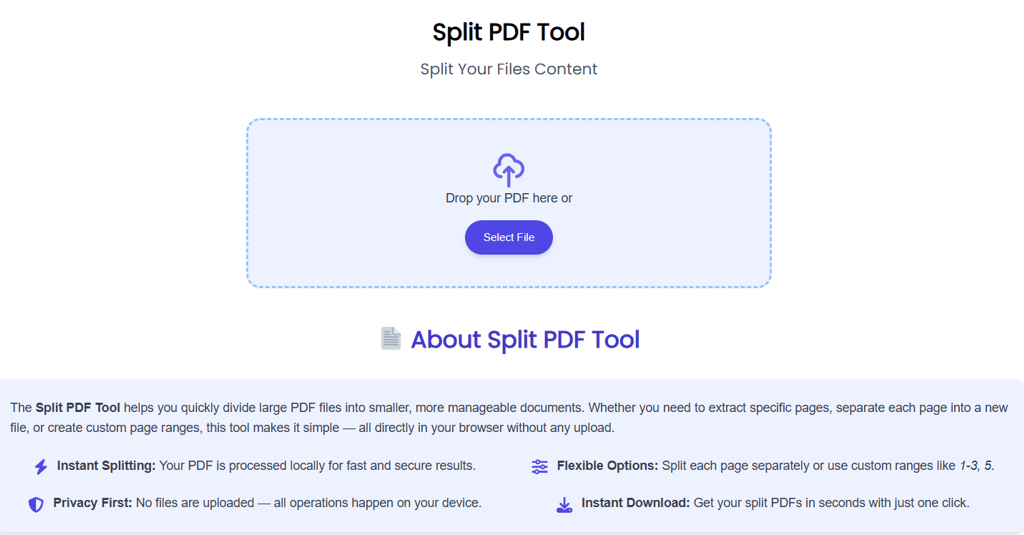
Step 1: Upload Your PDF
Click the upload button or drag and drop your file into the tool’s interface.
Step 2: Select the Splitting Option
You can choose:
Split by page range
Separate every page
Extract selected pages
Step 3: Confirm Your Settings
Check if the correct pages are selected and the format is correct.
Step 4: Start the Splitting Process
Click the "Split" or "Extract" button. The tool will process your PDF in a few seconds.
Step 5: Download Your New PDF
Once the split is complete, download the extracted pages or newly created PDF files.
This process is quick, simple, and perfect for anyone working with documents daily.
Advantages of Using an Online Split PDF Tool
Online tools offer several benefits:
1. No Installation Required
Avoid heavy software downloads. Everything is done in your browser.
2. Works on Any Device
Whether you’re on Android, iPhone, Windows, or Mac — the tool works universally.
3. Free to Use
Many online platforms offer free PDF splitting with excellent features.
4. Time Saving
You can complete the task in seconds without complicated software steps.
5. Easy Sharing
After splitting the PDF, you can instantly share the generated files via email, cloud, WhatsApp, etc.
Offline vs Online Split PDF Tools
Both forms have pros and cons:
Online Tools
Pros: Fast, convenient, no installation, free.
Cons: Requires internet connection.
Offline Tools
Pros: Works without internet, suitable for highly confidential files.
Cons: Requires installation, may take more storage space.
Depending on your workflow, you may prefer either one — but most users choose online tools due to convenience.
Choosing the Best Split PDF Tool
Selecting the right tool can improve your productivity. You should look for:
✔ Speed & Accuracy
The tool must quickly process large documents without errors.
✔ User-Friendly Interface
Clear options, simple design, and easy navigation.
✔ Security
The tool should delete files after processing and avoid storing your documents.
✔ No Watermark Output
Clean and professional results.
✔ Extra PDF Features
Tools that also offer merge, compress, convert, and edit options provide more value.
Common Use Cases for a Split PDF Tool
Here are the top situations where a split PDF tool becomes essential:
1. Schools & Students
Extracting assignments, notes, specific chapters, or selected pages.
2. Office & Corporate Use
Sharing only relevant parts of contracts, reports, or form sections.
3. Freelancers & Creatives
Splitting portfolios or separating project documents.
4. Legal Documents
Extracting specific clauses, pages, or case files securely.
5. E-book Readers
Splitting long e-books for easier reading or storage.
Conclusion
A split PDF tool is not just a technical feature it's a practical solution for everyday document management. Whether you need to extract a few pages, divide a large file, reduce storage size" or organize documents better, a reliable PDF splitting tool makes your workflow smooth" and efficient. With just a few clicks" you can save time, work more professionally" and manage your PDF files like a pro.
As the digital world continues, to grow, tools like PDF splitters are becoming essential for students" businesses, and professionals, across every industry. Choosing a fast" secure, and user"friendly split PDF tool ensures that you always stay productive and organized.
Contact
Questions? Reach out anytime, we're here.
Phone
hello@ailovetools.com
+1-555-123-4567
© 2025. www.ailovetools.com All rights reserved.